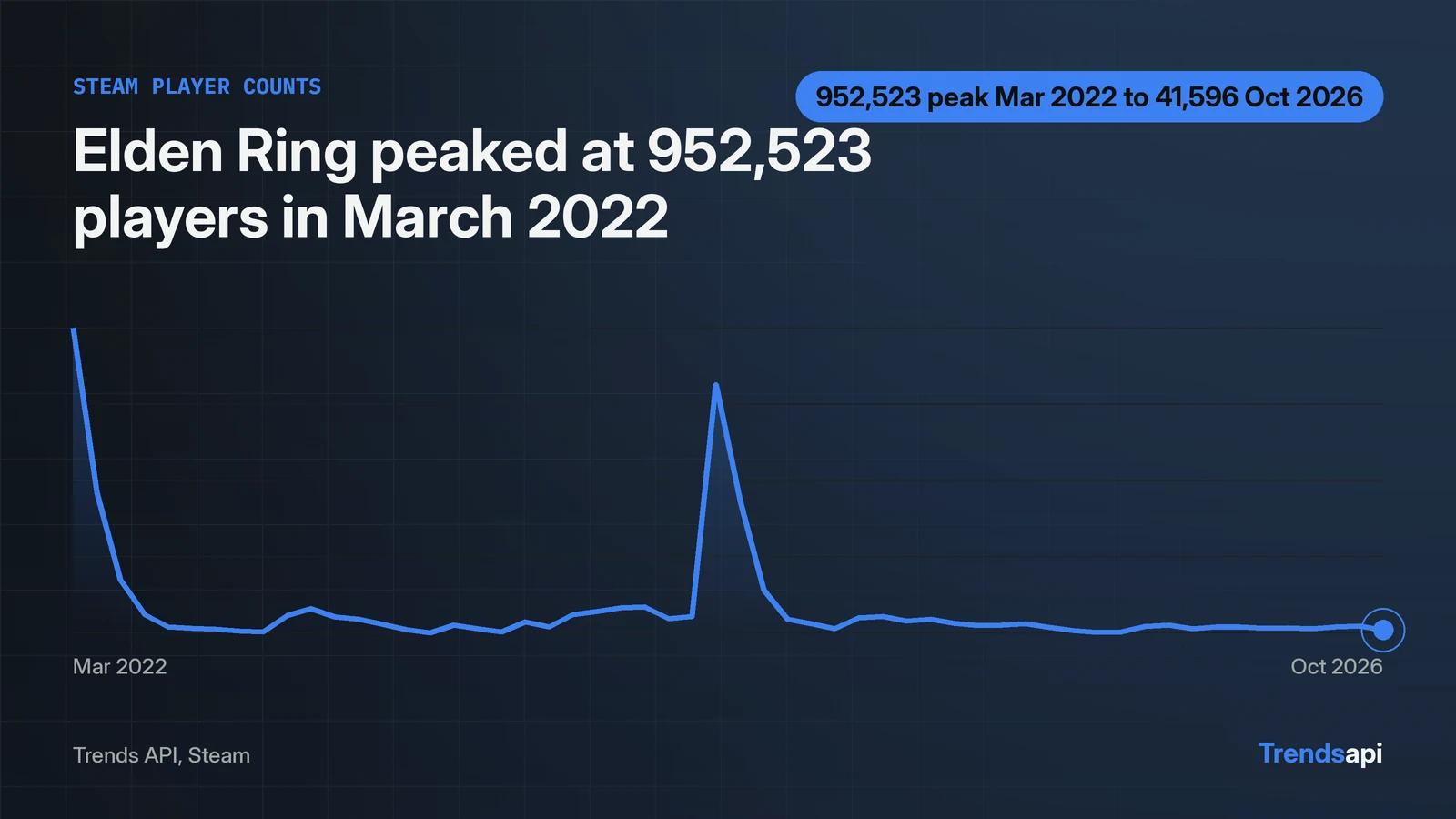
One POST returns Steam concurrent player counts for any game. The call is get_time_series with source Steam and the game display name as the keyword. The volume field on each point is the raw player count. A live call in this run returned 56 monthly points for Elden Ring, from 2022-03-31 to 2026-10-31. The peak reads 952,523 players on 2022-03-31. The last point reads 41,596 players on 2026-10-31. Find the request limits on /pricing.
One POST returns the player count history
One helper serves every call in this tutorial: the same endpoint, the same envelope check, no second helper. It posts the JSON body, attaches the key, checks the envelope, and hands back parsed data.
import json, os
import requests

KEY = os.environ["TRENDS_API_KEY"]
URL = "https://api.trendsmcp.ai/api"

def call(body):
    resp = requests.post(URL, headers={
        "Authorization": f"Bearer {KEY}",
        "Content-Type": "application/json",
    }, json=body, timeout=30)
    resp.raise_for_status()
    envelope = resp.json()
    if envelope.get("statusCode") != 200:
        raise SystemExit(envelope)
    parsed = envelope["body"]
    return json.loads(parsed) if isinstance(parsed, str) else parsed
The response needs one extra step after the HTTP layer. The envelope reports statusCode 200 and keeps the result in its body field, encoded as a JSON string. Code that treats that string as the result gets text instead of a list, so the helper runs json.loads on it first. This run checked the shape with a bare POST and found HTTP 200, statusCode 200, and 56 points inside the body string. The Steam trends page carries the same board for readers who want it without code.
series = call({
    "mode": "get_time_series",
    "keyword": "Elden Ring",
    "source": "Steam",
})
print(len(series))
for point in (series[0], series[-1]):
    print(point["date"][:10], point["value"], point["volume"])
Steam dates arrive with a time suffix, so the code trims each date to its first ten characters. The call costs 1 request.
The volume field is the player count
The player count is the volume field, not the 0-to-100 value index. Each point carries date, value, volume, keyword and a source label. The value is a 0 to 100 index. The volume is the raw player count (concurrent players, per the Trends API reference), and that is the number this tutorial is about.
Elden Ring launched into a peak that it never repeated. The first point, 2022-03-31, reads 100 on the index with 952,523 players. The series then falls fast: 457,067 players on 2022-04-30, then 192,569 on 2022-05-31. Points arrive monthly, dated to the last day of each month, so the series answers "how did this game hold players month to month" rather than "how many play right now". The last point, 2026-10-31, reads 0.7 on the index with 41,596 players. That date is 20 days before this run, which is expected for a monthly series rather than a sign of a stale feed.
The series also catches rebounds. December 2022 reads 85,651 players, up from 36,112 in November, and January 2023 reads 106,913. The index moves with it, from 0.8 to 4.1 and then 9.6. A monthly series will not show the day a rebound started, but it shows the size of one clearly enough to compare games. Read the rebound in the volume column: the index compresses small numbers near zero, so a jump from 36,112 to 85,651 players looks like a move from 0.8 to 4.1 on the index.
The index and the volume disagree, read the volume
Over 3 months the index fell 63.16 percent while the player count fell only 10.92 percent: near zero, the index lies and the volume tells the truth. Several windows fit in a single call, so both windows below came from one request.
growth = call({
    "mode": "get_growth",
    "keyword": "Elden Ring",
    "source": "Steam",
    "percent_growth": ["3M", "12M"],
})
for row in growth["results"]:
    print(row["period"], row["volume_growth"], row["recent_volume"], row["baseline_volume"])
The two windows tell different stories, and the index tells a third, wrong one. Over 3 months the index fell 63.16 percent, from 1.9 to 0.7, while the player count fell 10.92 percent, from 46,694 to 41,596. Over 12 months the player count rose 19.2 percent, from 34,896 to 41,596. The 12-month index change is unusable: the baseline index rounds to 0.0, so the API returns a growth figure of 999999.0 percent. That number is an artifact of a zero baseline, not a finding. When the index sits near zero, the volume change is the only growth figure worth quoting.
The Most Played board ranks games without counting players
The Most Played board gives rank and game name only; no player count travels with it. get_top_trends takes a board name and no keyword. It hands back the current ranking, or the games climbing fastest against an earlier snapshot.
board = call({"mode": "get_top_trends", "type": "Steam Most Played", "limit": 10})
print(board["as_of_ts"])
print(board["data"])
The call in this run returned ten rows from the snapshot taken 2026-11-20T09:01:33Z. Counter-Strike 2 sits first, Dota 2 second, PUBG: BATTLEGROUNDS third, then Bongo Cat, Team Fortress 2, Phantom Blade Zero, Slay the Spire 2, Apex Legends, Wallpaper Engine and Call of Duty. Each row carries rank and game name only. No player count travels with the board. To attach a count to a rank, run get_time_series for that game and read the latest volume.
The same call pattern covers a second game
Nothing in the code above is specific to Elden Ring. Swap the keyword and the same call runs for the game at the top of the board.
cs2 = call({
    "mode": "get_time_series",
    "keyword": "Counter-Strike 2",
    "source": "Steam",
})
print(len(cs2))
print(cs2[-1]["date"][:10], cs2[-1]["value"], cs2[-1]["volume"])
The live call returned 64 monthly points for Counter-Strike 2. The last point, 2026-10-31, reads 71.3 on the index with 1,402,441 players. Its peak volume is 1,818,368 players on 2025-03-31, at an index of 93.0. The contrast with Elden Ring is the point of the comparison: one game holds 1,402,441 players at its latest monthly point, the other 41,596.
| Game | Points | Last point | Last player count | Peak player count |
|---|---|---|---|---|
| Elden Ring | 56 | 2026-10-31 | 41,596 | 952,523 on 2022-03-31 |
| Counter-Strike 2 | 64 | 2026-10-31 | 1,402,441 | 1,818,368 on 2025-03-31 |
Use the game display name, never a Steam App ID. The API matches the name against the Steam store and takes the first result, so an ambiguous name can return the wrong game. Check the first point's keyword and the rough size of the peak before trusting a series for a name with several matches.
Four data calls cover the whole tutorial
Count the requests this tutorial spent: one series for Elden Ring, one growth call, one board call, one series for Counter-Strike 2. Four data calls, plus one direct POST that confirmed the envelope shape. Saving the series to a file keeps the next run free of repeat calls.
import csv

with open("elden-ring-steam.csv", "w", newline="") as f:
    writer = csv.DictWriter(f, fieldnames=["date", "value", "volume", "keyword"])
    writer.writeheader()
    writer.writerows(series)
The file holds the same 56 points the tutorial printed. A second game needs only a new keyword and a new file name. The board call is the one worth repeating: its snapshot is stamped 2026-11-20T09:01:33Z, while a monthly series only gains a new point at month end.