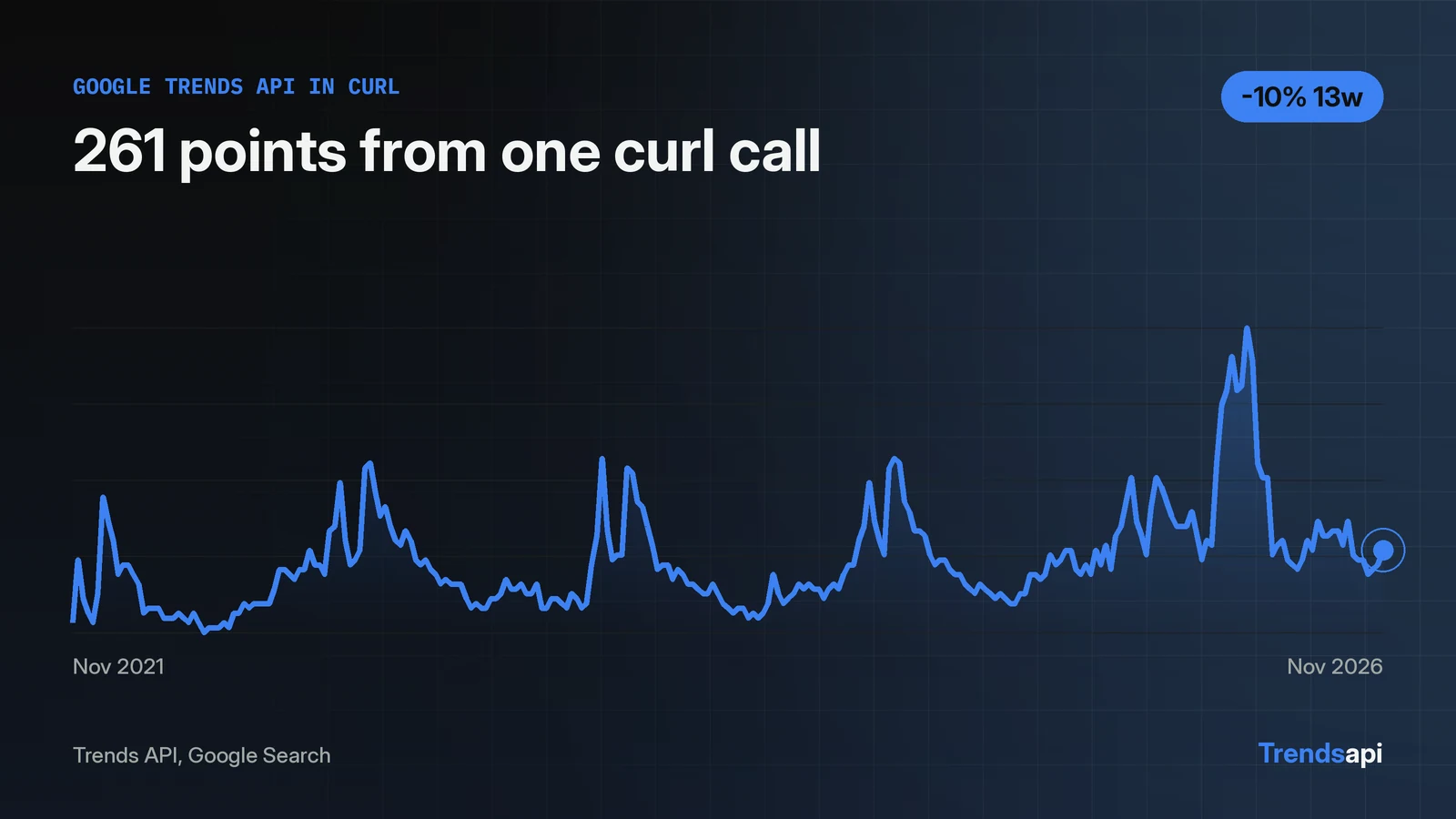
Four curl commands cover the Google Trends API: history, growth, a live board and news context. Each one posts to the same endpoint, https://api.trendsmcp.ai/api, with the same two headers, and each one ran in this run. The history call for "air fryer" on Google Search brought back 261 weekly points covering 2021-11-20 to 2026-11-14. The growth call put the same keyword down 10 percent over 3 months and down 8.47 percent over 12 months. The board call returned the five live leaders as of 09:01 UTC on November 24. The context call returned 10 news stories from the last 7 days. Each call costs one request, and a failed call costs nothing.
One endpoint carries all four calls
One address serves every tool. The request always goes to the same URL with the same two headers; only the JSON body changes, and inside it the mode field names the tool: history, growth, boards or context. The four answers look nothing alike. A history call hands back dated points, oldest first. A growth call hands back one row per window, with the recent and baseline values beside the percent change. A board call hands back ranked rows. A context call hands back items, each with its engagement attached. Both headers ride along on every request:
Authorization: Bearer <key>
Content-Type: application/json
Every example below passes the key as $TMCP_API_KEY, so the secret stays out of the command itself. The setup guide shows how to get the key and prove it works; this page assumes the key is already set. The docs carry the full mode list with each mode's options.
History: 261 weekly points for "air fryer"
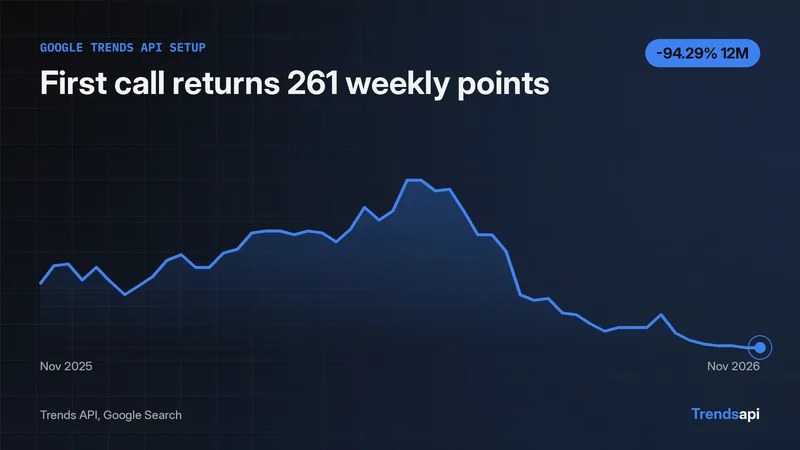
The history call returns the full series for one keyword on one source: 261 weekly points for "air fryer".
curl -s -X POST https://api.trendsmcp.ai/api \
  -H "Authorization: Bearer $TMCP_API_KEY" \
  -H "Content-Type: application/json" \
  -d '{"mode": "get_time_series", "keyword": "air fryer", "source": "Google Search"}'
This exact command ran in this run and returned 261 points. The series starts at 39.0 on 2021-11-20 and ends at 54.0 on 2026-11-14, with a volume of 4,313,672 attached to the last point. The peak sits at 100 on 2026-05-09. The closing five weeks, October 17 to November 14, read 52, 49, 50, 51 and 54. The API reference defines values as interest on a 0 to 100 scale, not absolute counts, and 100 labels the busiest week of the returned window. Swap the keyword and the source to reuse the call. The docs list the same shape for YouTube, Wikipedia, TikTok and the other keyword sources.
Growth: two windows, one call
The growth call returns both windows in one response: down 10 percent over 3 months, down 8.47 percent over 12 months.
curl -s -X POST https://api.trendsmcp.ai/api \
  -H "Authorization: Bearer $TMCP_API_KEY" \
  -H "Content-Type: application/json" \
  -d '{"mode": "get_growth", "keyword": "air fryer", "source": "Google Search", "percent_growth": ["3M", "12M"]}'
One call returned both windows. Over 3 months, interest fell 10 percent, from 60.0 on 2026-08-15 to 54.0 on 2026-11-14. Over 12 months, it fell 8.47 percent, from 59.0 on 2025-11-15 to 54.0 on the same recent date. Both windows cost one request together, not one per window, per the API reference. Windows run from 7D to 5Y, plus MTD, QTD and YTD, and a custom range takes an object with a name, a recent date and a baseline date. The growth response carries no volume growth for this source: the API notes volume is derived from the trend value here, not an independent measurement, so the percent change in the index is the figure to quote.
The live board, five rows
The board call returns the live leaders, no keyword needed: five rows as of 09:01 UTC on November 24.
curl -s -X POST https://api.trendsmcp.ai/api \
  -H "Authorization: Bearer $TMCP_API_KEY" \
  -H "Content-Type: application/json" \
  -d '{"mode": "get_top_trends", "type": "Google Trends", "limit": 5}'
The snapshot taken at 09:01 UTC on November 24 put "gta 1" first, "anthropic stock" second, "fiona the hippo" third, "haymitch" fourth and "jensen huang reinstated as ceo" fifth. Rows arrive as rank and keyword pairs, and limit takes 1 to 200. The board is live, and each response carries an as_of_ts timestamp. Add "sort": "rank_change" and a "window" such as "7d" to get climbers instead of leaders:
curl -s -X POST https://api.trendsmcp.ai/api \
  -H "Authorization: Bearer $TMCP_API_KEY" \
  -H "Content-Type: application/json" \
  -d '{"mode": "get_top_trends", "type": "Google Trends", "sort": "rank_change", "window": "7d", "limit": 5}'
The same 09:01 snapshot, sorted by climbers, put "manni l perez" first, up 40 ranks from 59 to 19 against the November 18 baseline, followed by "gta 6 map" up 18, "mcdonalds home alone meal" up 14, "dancing with the stars voting" up 7 and "anne hathaway" up 5. The board name is the one required field: leave it out and the call fails, as the error section below shows.
News context behind a keyword
The context call returned 10 news stories about "air fryer" from the last 7 days.
curl -s -X POST https://api.trendsmcp.ai/api \
  -H "Authorization: Bearer $TMCP_API_KEY" \
  -H "Content-Type: application/json" \
  -d '{"mode": "get_context", "keyword": "air fryer", "source": "News"}'
The call returned 10 stories from the last 7 days. The first, published 2026-11-21, carries a Black Friday angle: a meal-kit roundup promising $3 meals and a free air fryer toaster oven. Four outlets carried versions of that story. One source per call over REST, so a second source means a second call; days takes 1 to 30 and defaults to 7. Context adds the posts and stories behind a keyword; history shows only that it moved.
The response body is a JSON string, parse it again
Every answer arrives wrapped. The outer JSON has two fields: statusCode, which reads 200 on success, and body, which holds the payload as a string rather than as a list. A second parse turns that string into the points; skip it and the code works with text instead of a list. In jq the second parse is one pipe:
curl -s -X POST https://api.trendsmcp.ai/api \
  -H "Authorization: Bearer $TMCP_API_KEY" \
  -H "Content-Type: application/json" \
  -d '{"mode": "get_time_series", "keyword": "air fryer", "source": "Google Search"}' \
  | jq -r '.body | fromjson | length'
The output is 261. The same pipe with a different tail reads the last point:
curl -s -X POST https://api.trendsmcp.ai/api \
  -H "Authorization: Bearer $TMCP_API_KEY" \
  -H "Content-Type: application/json" \
  -d '{"mode": "get_time_series", "keyword": "air fryer", "source": "Google Search"}' \
  | jq -r '.body | fromjson | .[-1] | "\(.date) \(.value)"'
The output is 2026-11-14 00:00:00+00:00 54.0, matching the last point of the series. The JSON parsing guide walks through the same envelope, with the Python version of the second parse.
Save a response to a file
Add -o and the series lands in a file instead of the terminal, which keeps a 261-point body out of scrollback:
curl -s -X POST https://api.trendsmcp.ai/api \
  -H "Authorization: Bearer $TMCP_API_KEY" \
  -H "Content-Type: application/json" \
  -d '{"mode": "get_time_series", "keyword": "air fryer", "source": "Google Search"}' \
  -o air-fryer-series.json
The file holds the same envelope, so jq reads it from disk with the same expression: jq -r '.body | fromjson | length' air-fryer-series.json prints 261, and jq -r '.body | fromjson | .[0] | "\(.date) \(.value)"' air-fryer-series.json prints 2021-11-20 00:00:00+00:00 39.0. Both commands ran in this run against the saved file.
Three errors, three different fixes
Three probes ran in this run, one per fault:
| Probe | Request | Response | Reading |
|---|---|---|---|
| No key sent | The history call without an Authorization header |
HTTP 401, {"error": "missing_api_key"} |
The server never saw a key |
| Made-up key | The history call with a fake key | HTTP 403, {"error": "invalid_api_key"} |
The key failed, not the request |
| Missing type | get_top_trends with no type |
HTTP 200, envelope statusCode 400, {"error": "invalid_request"} |
The request failed, not the key |
Read the three responses as three different faults. A 401 says the request arrived without a key, so the header or the variable needs a look. A 403 says the key arrived and failed, so the fix is a fresh copy from the account page. The bad query is the odd one: the HTTP code still read 200 while the envelope carried statusCode 400. Judge a call by the envelope, not the HTTP code; a 200 can hide a failure, and failures cost nothing.
Keep the key in an environment variable
Keep the key out of every command. Keep it in a .env file and export it before running curl, then pass $TMCP_API_KEY as the header value. Scripts that wrap these calls follow the same rule: read the variable at runtime and never hardcode the value. Request limits live on the pricing page.